Earlier on WPBeginner, we showed you how to embed tweets in your WordPress post. Recently Facebook announced the ability to embed Facebook Status Posts anywhere on the web. In this article, we will show you how to embed Facebook statuses in your WordPress posts and pages.
What Kind of Facebook Status Posts You Can Embed?
You can embed any Facebook status post made publicly available by any Facebook page or profile. Posts which are publicly available have a globe icon next to them. For example, visit WPBeginner’s Facebook page, and you will see the globe icon next to our status posts like this:

Clicking on the date or time link will open that particular status update. Copy the URL of the Facebook status that you want to embed because you will need it in the next steps.
There are two ways of embedding Facebook statuses in WordPress.
Using Facebook Plugin for WordPress
The easiest way to embed Facebook statuses in your WordPress posts or pages is by installing and activating the official Facebook plugin for WordPress. After activating the plugin, simply go to the post and paste the URL of Facebook status you want to embed in its own line.
Save your post and preview it. You will be able to see the Facebook status embedded right into your post.

Manually Embedding a Facebook Status in WordPress
If you do not want to use the Facebook plugin, then you can manually embed Facebook status posts in WordPress. However, this solution is not as neat as using the official plugin.
First thing you need to do is get the URL of the public post you want to embed. Go to Embedded Posts page on Facebook Developers site. Paste the URL of the Facebook status and press the get code button.
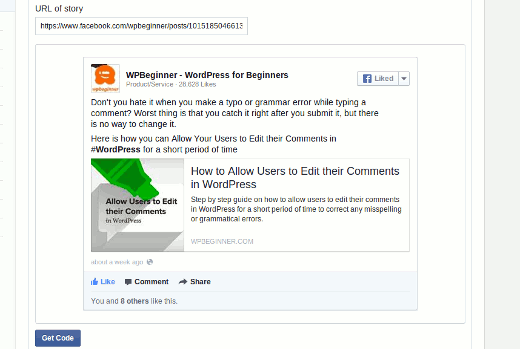
A popup window would appear with multiple options. The easiest solution is the iFrame method. Simply paste the iFrame code in your post or page.
This is good if you’re only going to embed the Facebook statuses once in a while.
WordPress by default has built-in support for various oEmbed providers like Twitter, Youtube, etc. We hope that Facebook enables the oEmbed protocol, so this becomes easier in the future.
We hope this article helped you embed Facebook status posts in WordPress. Check out some of our Facebook articles: how to add a Facebook fan box, like button, and recommendation bar.
Would you embed Facebook status in your WordPress posts? Let us know by leaving a comment below.
To leave a comment please visit How to Embed Facebook Status Posts in WordPress on WPBeginner.
via WPBeginner http://feeds.wpbeginner.com/~r/wpbeginner/~3/b0JaplneMMU/
WordPress Hosting Tips

No comments:
Post a Comment